
User Tools
Table of Contents
Opening & Saving your work
To properly save and secure your work, you should use the “Network Drives” that are provided to you. These are drives not located on your computer for security and backup purposes. These drives are backed up daily at 6pm to ensure that if anything goes missing, that it can be recovered. These drives are accessible from any computer you log onto.
Step 1: Locate the shortcut to Computer/This PC
On the desktop, there is a shortcut to Computer, double click to open this

Step 2: Locate the shared drives in Computer/This PC
In this window, you have access to the network drives that have been allocated to you, in the Network Locations section of the window
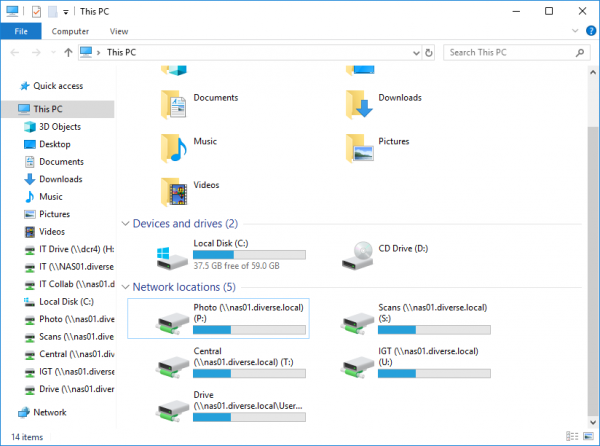
In here, you'll have access to the Z Drive, the last drive in the list. This is your personal drive, that only you can access, use this for storing documents and files that only you'll need access to.
You will also have access to group drives, that anyone in that particular departments will have access to.
There are several unique network drives for different purposes:
Scans Drive - Documents scanned in on any scanner in the company will appear here, please retrieve your scanning and move it to an appropriate location if it is confidential. This drive is emptied daily.
Central Drive - These are company wide documents, including HR forms, logo files, policies and other documents that apply to the whole company.
Documents stored on your Desktop, Documents and Pictures folder will synchronise between computers that you log onto as well, but are a less reliable form of storage, than the network drives, please only use this for less important information.
Step 3: Save as you go!
Unfortunately, computers and microsoft office will eventually crash, for one reason or another. Please make sure that you save your documents as you go, especially after any major changes or updates, this will help avoid any data loss in the event that your computer were to crash.
Microsoft office products such as Word and Powerpoint have limited “Autosave” functionality, that will automatically create a backup copy every 10 minutes, this is by no means infallible though, and may not work.


